Configure Background
Setting background functions allows us to send new information as we get notified, helping to resend that information to you through your webhook previously configured in the ROOK Portal.
For security, iOS devices encrypt the HealthKit storage when users lock their devices. As a result, apps may not be able to read data from Apple Health when running in the background. Please refer to the official documentation for more information.
In the app delegate of your app, add the setBackListeners() method in the didFinishLaunchingWithOptions function.
Example
import RookSDK

class AppDelegate: NSObject, UIApplicationDelegate {

  func application(_ application: UIApplication,
                   didFinishLaunchingWithOptions launchOptions: [UIApplication.LaunchOptionsKey : Any]? = nil) -> Bool {
    RookBackGroundSync.shared.setBackListeners()
    return true
  }
}
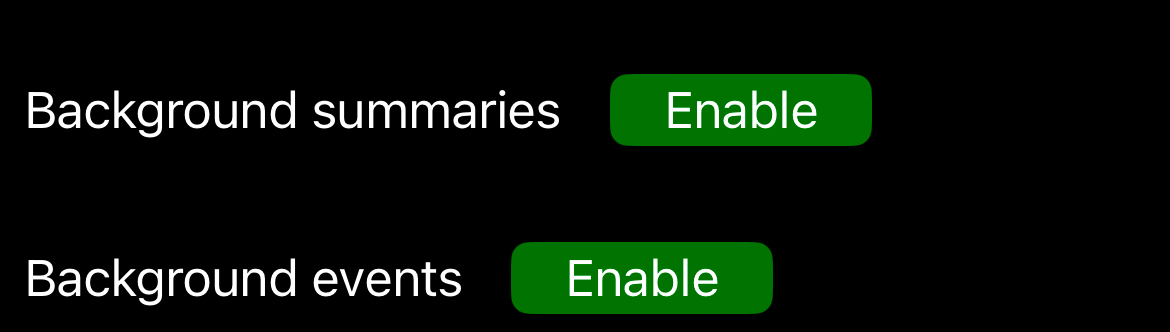
Next, we need to enable or indicate to the SDK to stay listening for new notifications. We recommend enabling this in your main view after login to ensure the user activates this function, as shown below.
import RookSDK

struct HomeView: View {

  @StateObject var viewModel: HomeViewModel = HomeViewModel()

  var body: some View {
    VStack {
      statusBackgroundView
      homeView
    }.onAppear {
      viewModel.onAppear()
    }
  }

  private var homeView: some View {
    VStask {
      // your custom view code
    }
  }

  private var statusBackgroundView: some View {
    VStack {
      HStack {
        Text("Background summaries")
          .padding(.horizontal, 8)

        if viewModel.loadingSummariesBackgroundStatus {
          ProgressView()
        } else {
          Button(action: {
            viewModel.toggleSummariesBackgroundStatus()
          }, label: {
            VStack {
              Text(viewModel.summariesStatusText)
                .padding(18)
                .foregroundColor(.white)
            }
            .frame(height: 24)
            .background(Color(viewModel.summariesStatusColor, bundle: nil))
            .cornerRadius(6)
          })
        }

        Spacer()
      }
      .padding(.vertical, 12)

      HStack {
        Text("Background events")
          .padding(.horizontal, 8)

        if viewModel.loadingEventsBackgroundStatus {
          ProgressView()
        } else {
          Button(action: {
            viewModel.toggleEventsBackgroundStatus()
          }) {
            VStack {
              Text(viewModel.eventsStatusText)
                .padding(18)
                .foregroundColor(.white)
            }
            .frame(height: 24)
            .background(Color(viewModel.eventsStatusColor, bundle: nil))
            .cornerRadius(6)
          }
        }

        Spacer()
      }
      .padding(.vertical, 12)
    }
  }
}
class HomeViewModel: ObservableObject {
  @Published var summariesStatusText: String = ""
  @Published var eventsStatusText: String = ""

  @Published var summariesStatusColor: String = "RedStatus"
  @Published var eventsStatusColor: String = "RedStatus"

  @Published var loadingSummariesBackgroundStatus: Bool = false
  @Published var loadingEventsBackgroundStatus: Bool = false

  func onAppear() {
    getBackgroundStatusSummaries()
    getBackgroundStatusEvents()
  }

  func getBackgroundStatusSummaries() {
    if RookBackGroundSync.shared.isBackGroundForSummariesEnable() {
      DispatchQueue.main.async {
        self.summariesStatusText = "Enable"
        self.summariesStatusColor = "GreenStatus"
      }
    } else {
      DispatchQueue.main.async {
        self.summariesStatusText = "Disable"
        self.summariesStatusColor = "RedStatus"
      }
    }
  }

  func getBackgroundStatusEvents() {
    if RookBackGroundSync.shared.isBackGroundForEventsEnable() {
      DispatchQueue.main.async {
        self.eventsStatusText = "Enable"
        self.eventsStatusColor = "GreenStatus"
      }
    } else {
      DispatchQueue.main.async {
        self.eventsStatusText = "Disable"
        self.eventsStatusColor = "RedStatus"
      }
    }
  }

  func toggleSummariesBackgroundStatus() {
    self.loadingSummariesBackgroundStatus = true
    if RookBackGroundSync.shared.isBackGroundForSummariesEnable() {
      RookBackGroundSync.shared.disableBackGroundForSummaries()
      getBackgroundStatusSummaries()
    } else {
      RookBackGroundSync.shared.enableBackGroundForSummaries()
      getBackgroundStatusSummaries()
    }
    self.loadingSummariesBackgroundStatus = false
  }

  func toggleEventsBackgroundStatus() {
    self.loadingEventsBackgroundStatus = true
    if RookBackGroundSync.shared.isBackGroundForEventsEnable() {
      RookBackGroundSync.shared.disableBackGroundForEvents { [weak self] in
        self?.getBackgroundStatusEvents()
        DispatchQueue.main.async {
          self?.loadingEventsBackgroundStatus = false
        }
      }
    } else {
      RookBackGroundSync.shared.enableBackGroundForEvents()
      getBackgroundStatusEvents()
      self.loadingEventsBackgroundStatus = false
    }
  }
}
Historical synchronization in SDK 4.2.0
When initRook succeeds, the SDK retrieves the historical-data window configured for your client. With summary or event background synchronization enabled, the SDK then processes eligible data from before the user's registration date:
- Sleep, physical, and body summaries are included.
- Activity, heart rate, oxygenation, temperature, blood pressure, blood glucose, body metrics, nutrition, hydration, ECG, steps, and calories events are included.
- Successfully uploaded historical records are stored locally and are not uploaded again.
- Failed uploads remain eligible for retry.
- Regular missing-data synchronization is bounded by the date when the current user was registered with the SDK.
The historical window is controlled by the ROOK backend. No additional app-side configuration is required beyond initializing the SDK, registering the user, granting the relevant HealthKit permissions, and enabling the corresponding background synchronization.
Hydration background synchronization requires read access to HealthDataType.dietaryWater.